
Mar 27 2011
VCA 2010 RACE RUN on Vimeovia vimeo.com
Valpariso in Chile is home to the world’s wildest bike race.
Looks like fun – one for you perhaps, Connor?

Mar 27 2011
VCA 2010 RACE RUN on VimeoValpariso in Chile is home to the world’s wildest bike race.
Looks like fun – one for you perhaps, Connor?
Mar 26 2011
5 Amazing Things Invented by Donald Duck
Donald, his nephews, and Uncle Scrooge have been busy changing the world for 50 years.
Cracked Magazine points out that they have always been ahead of their time. Did you know the ducks’ adventures form the basis of some very recent movies, as well as paving the way for scientific breakthroughs?
Mar 25 2011
Photoshop Basics in 25 minutes
Do you want to look 10 years younger?
You could
exercise 45 minutes each day, drink more water and less alcohol, eat much less and stay out of the sun at all times.
Or you could
schedule a regular visit with the beautician, and purchase a cabinet full of anti-aging potions specially designed by a major scientific centre of excellence such as the Ponds Institute.
You could even
visit a cosmetic surgeon and undergo a series of painful injections,lifts and tucks.
Or you could
continue with your dissolute lifestyle, while spending a few hours becoming an expert on Photoshop.
Photoshop allows you to modify and retouch photographs in many different ways.
For example, compare this same photo of a random happy couple before photoshop filters were applied…..
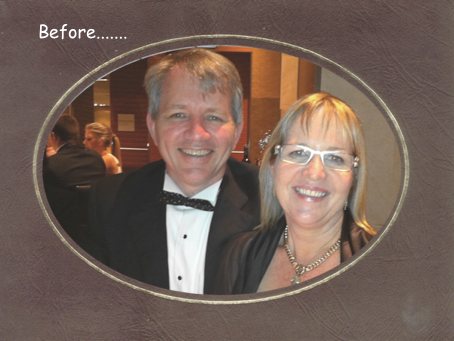
and after photoshop has done its stuff……..

Photoshop is expensive. You can download a free Photoshop 30-day trial from Adobe.
On the Mac, I use Pixelmator whenever I need to combine a lyrebird with Weird Al Yancovic. Pixelmator is available from the pixelmator web site.
There is also an open source, fully featured,cross platform, free version of Photoshop called GIMP which is available for Mac, Windows and Linux.
This is what I learnt today. Our friends at Lifehacker have recently featured a complete guide to the basics (and beyond) of photoshop.
The Lifehacker Complete Guide to Photoshop includes:
 Alfabeto Medico
 Didja Havagoodweegend?
Mar 24 2011
Mind Burning – How to Learn New Stuff Part 2See How to Learn New Stuff Part 1

Can a system help you remember everything you have ever learnt?
In a previous WILT article, we learnt that testing yourself early was the best way to make sure you can recall new information.
But registering information in the library of your mind is only the first part of the story. How can you ensure that you can find that information when you need it – weeks, months or years afterwards? How can you burn it deep into long term memory, and still be able to recall it readily.
In 1885, the German scientist Hermann Ebbinghaus published a monograph called Memory: A Contribution to Experimental Psychology, which included discussion of ‘the spacing effect’ – it is possible to increase learning by correctly spacing practice sessions.
The best time to revise something is just before you are about to forget it – do it earlier than that and your effort is wasted, do it later than that and you are back to first base.
There is an optimal time period for each person to first revise new learnings (a few days) and another longer period for a second revision (about a week) and longer again for a third revision (a few weeks) and so on.
Polish Professor Piotr Wozniak has devoted his life to learning in this systematized way,
In 2005 he was featured in a fascinating Wired Magazine article by Gary Wolf.
So, here is the WILT take on how to learn new things –
1 When first introduced to new information, test your recall immediately and then again some minutes later, as described in our previous discussion. This process will produce a written question and answer – which it is important to keep.
2 Test yourself again on that information 3 days later, which is when you where just about to forget it.(if you can’t remember, relearn it and test again in 3 days. If you can, move to Step 3)
3. Test your recall again 1 week later.(if you can’t remember, relearn it and move back to Step 2. If you can, move to Step 4)
4. Test your recall again 1 month later.(if you can’t remember, learn it and move back to Step 2. If you can, move to Step 5)
5, Test again 3 months later.
How can you keep track of all this?
You could use a Tickler filing system for storing your future revision material in the right place, as described by David Allen in Getting Things Done. Instructions are available free on his web site, and elaborated on at 43folders.com
Or you could use a computer program to keep track of it all.
Professor Wozniak developed software called Supermemo to organize his learning. It has been available for Windows for some years, is now available online, and has recently been adapted for iPhone and iPad.These are the perfect devices for this purpose.
The basic program is free online or a free download from the iTunes store. You can use it to create your own courses, entering questions to test yourself in a number of formats.
You can also purchase language courses, including Chinese which at the moment is available at a half price $12.99. (you can download a demo with some basic courses for free)
Supermemo is a patient teacher. It will ask you the same questions every few days until you know the answer, and then ask you again to check your recall it at extended intervals. It never gets an exasperated look on it’s face the way I do when I’m helping the kids with Math’s homework.
We often think that a genius is born, not created. Not according to Piotr Wozniak. Gary Wolf reports that this is his prescription for becoming a genius.
“His advice was straightforward yet strangely terrible: You must clarify your goals, gain knowledge through spaced repetition, preserve health, work steadily, minimize stress, refuse interruption, and never resist sleep when tired. This should lead to radically improved intelligence and creativity.”
How do you best learn things? Do you have experience with learning systems? Your comments welcome below.
Add a comment
Mar 23 2011
ReservationsLast night my flight arrived in Canberra at 11.30pm.
At the hotel, I was told that there were no rooms left.
“Have you got my reservation?”
“Oh yes sir. We have the reservation. We just don’t have the room/”
Mar 22 2011
Creating a Web App


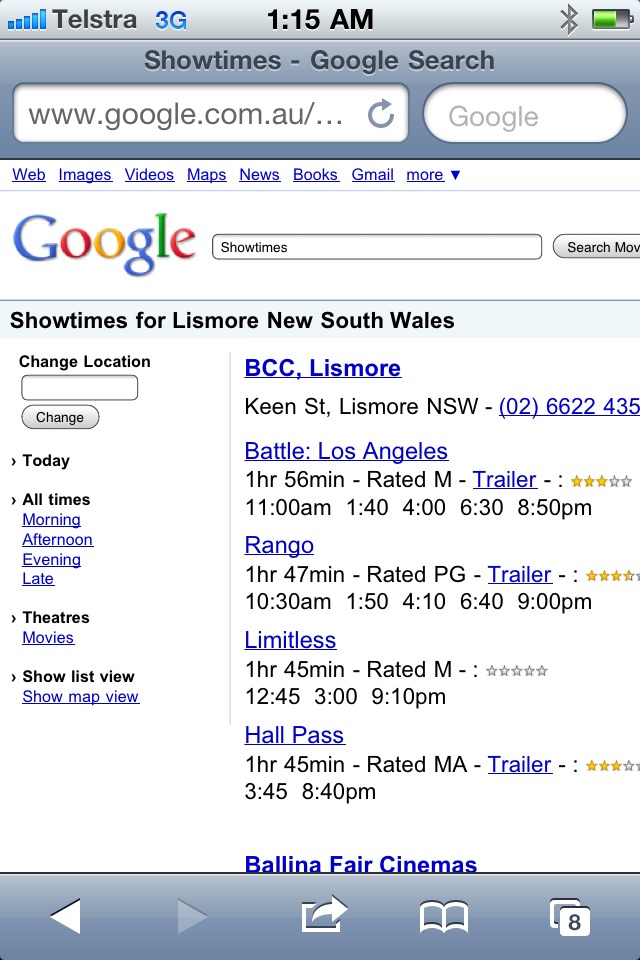
Before there were apps, there were Web Apps.
A WebApp is a website that has been specially designed to be viewed on a mobile device. Before the App Store was created, WebApps were the only way to add new applications to your iPhone or iPod touch. The special WebApp bookmarking technique remains an excellent (but rather forgotten) way to make your favourite websites readily available. You don’t need to go through the iTunes store, and they are free.
To pick an example at random, suppose you want to make the site ‘whatIlearnttoday.com.au’ into an app on your iPad.
Here are the steps
1 Open Safari on your iPad.
2 Go to the web page ‘whatIlearnttoday.com.au’
3. Tap the share button on the bottom of the screen. (as shown)
4. Select the option ‘Add to Home Page’ 5. Change the name of the bookmark to ‘WILT’, (the new nickname of What I Learnt Today)
6. Click ‘Add
Voila. A new app will have been created called WILT
On the iPad, it will have the appropriate WILT icon.
Unfortunately, on the iPhone the icon will be a yellow box called Posterous.
Here are some other web apps you may like to add to your home screens using the same technique above. New iPad and iPhone Buying Guide
 Bach without Bite
One thing I learn each day by Tony Lembke.


 RSS - Posts